
JavaScript Operators:
A beginner-friendly guide to arithmetic, comparison, logical, and assignment operators.

While writing code, we often need to calculate prices, compare two passwords, or check if a user is logged in. And we need operators here. An operator in JavaScript is a symbol that performs an action on one or more values and returns a result.
Javascript provided a wide range operators:
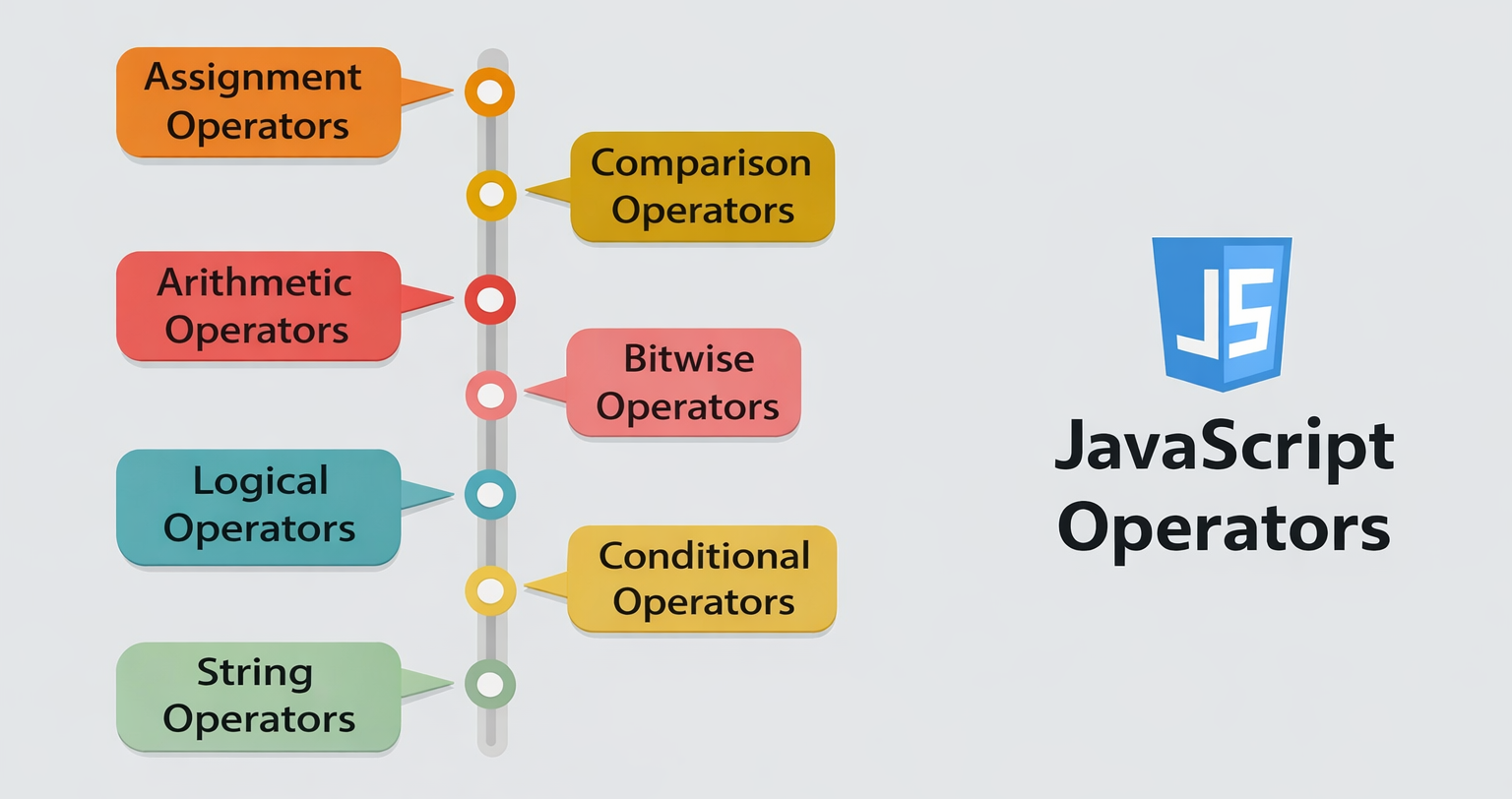
But in this blog we are gonna cover four basic operators only i.e.
Arithmetic —
+,-,*,/,%Comparison —
==,===,!=,>,<Logical —
&&,||,!Assignment —
=,+=,-=
The other 4 (bitwise, ternary, typeof, etc.) are more advanced and will be cover lately.
Arithemetic Operator:
Whenever you used calculator or apply operation of +,-,*,/,% these all are aritemetic operators. JavaScript does the exact same thing using arithmetic operators.
Here are 5 you need to know about:
| Operator | Symbol | What it does |
|---|---|---|
| addition | + |
adds two number |
| subtraction | - |
subtract two number |
| multiplication | * |
multiply two number |
| division | / |
returns quotient |
| modulo | % |
returns remainder |
let a = 10;
let b = 3;

console.log(a + b);  // 13 → Addition
console.log(a - b);  // 7  → Subtraction
console.log(a * b);  // 30 → Multiplication
console.log(a / b);  // 3.33 → Division
console.log(a % b);  // 1  → Modulo (remainder)
⚠️ What is
%? It gives you the remainder after division. So10 % 3is1because 3 goes into 10 three times, with 1 left over. It's super useful for checking if a number is even or odd.
console.log(10 % 2);  // 0 → even number
console.log(11 % 2);  // 1 → odd number
Comparison Operator:
Comparision operators compares two values and always returns true or false.
Here are 5 you need to know about:
| Operator | Symbol | What it checks |
|---|---|---|
| addition | > |
greater than |
| subtraction | < |
less than |
| multiplication | != |
not equal too |
| division | == |
are values equal |
| modulo | === |
are both values and type equal |
let a = 10;
let b = 5;

console.log(a > b);   // true  → greater than
console.log(a < b);   // false → less than
console.log(a != b);  // true  → not equal
⚠️NOTE:
==&===difference?Every begineer must fall for this.
==It compares only value.===it compares bith value and type
console.log(5 == "5");   // true  → only checks value
console.log(5 === "5");  // false → checks value AND type
== sees 5 and "5" as the same because it only compares the value. === catches that one is a number and the other is a string — so it returns false.
⚠️ Common Mistake: Always use
===in your code.==can cause sneaky bugs that are hard to track down. Most professional JavaScript developers avoid==entirely.
Logical Operator
You can think of logical operator as the words "and", "or", and "not" in plain English.
Here's the simple way to remember each one:
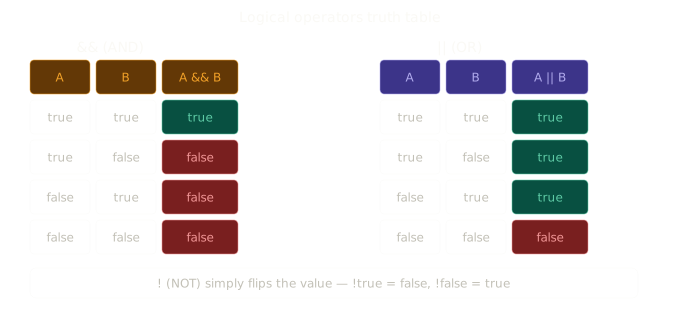
&&— AND — both conditions must be true||— OR — at least one condition must be true!— NOT — flips true to false, and false to true
let isLoggedIn = true;
let isAdmin = false;

console.log(isLoggedIn && isAdmin);  // false → both must be true
console.log(isLoggedIn || isAdmin);  // true  → at least one must be true
console.log(!isLoggedIn);            // false → flips the value
A real-world example:
let hasTicket = true;
let isVIP = false;

if (hasTicket && isVIP) {
  console.log("Welcome to the VIP lounge!");
} else {
  console.log("Enjoy the show!");  // this runs
}
💡 This is exactly how real apps work — checking multiple conditions before allowing access.
There is a popular word as Truthtable, while learning about logical operator. It's nothing fancy but shows all the possible outcomes that can be genrated via logical operators.
Assignment Operator:
Assignment operators are used to assign values or update them with improved syntax.
=It's the simplest one which is used to assign values to variable.
//To assign a value
const name = "Mohit"
+=It assign values after adding as per user instrruction.
let num = 10;
// if you want to add 5 to nums then you can write
// num = num + 5;

//via Assignment operators - more professional ans short
num += 5;
console.log(num);    //15
Here num += 5 is nothing special but num = num + 5.
Other operator can be written in same way:
let num = 10;

//subtraction
num -= 5;            // num = num - 5;
console.log(num)    //5

//multiplication
num *= 2;            // num = num * 2;
console.log(num)    //10

//division
num *= 5;            // num = num / 5;
console.log(num)    //50

//modulo
num %= 2;            // num = num % 2;
console.log(num)    //0


