
Array Methods You Must Know

In the previous article, we have learned basics of array, it's property and a very short introductions about methods.
Methods are the functions which belongs to an object and perform some actions. So let's explore some important methods that are commaly used to optimize our code.
push():
It used to insert an element in an array.
It append at the end of the array.
length becomes length + 1 as we inserting a new element.
const fruits = ["Apple", "Kiwi", "Orange"];
console.log(fruits);
//Before push => [ 'Apple', 'Kiwi', 'Orange' ]

fruits.push("Banana");
console.log(fruits);
//After push => [ 'Apple', 'Kiwi', 'Orange', 'Banana' ]
pop():
It used to delete an element from array.
It remove an element from the end.
lenght becomes length - 1, as we removing a element.
const fruits = ["Apple", "Kiwi", "Orange"];
console.log(fruits);
//Before pop - [ 'Apple', 'Kiwi', 'Orange' ]

fruits.pop();
console.log(fruits);
//After pop - [ 'Apple', 'Kiwi' ]
shift():
It is used to delete an element from array.
It removes an element from the start of the array.
length becomes length - 1, as we are removing an element.
const fruits = ["Apple", "Kiwi", "Orange"];
console.log(fruits);
//Before shift => [ 'Apple', 'Kiwi', 'Orange' ]

fruits.shift();
console.log(fruits);
//After shift => [ 'Kiwi', 'Orange' ]
unshift():
It is used to insert an element in array.
It appends at the start of the array.
length becomes length + 1, as we are inserting a new element.
const fruits = ["Apple", "Kiwi", "Orange"];
console.log(fruits);
//Before unshift => [ 'Apple', 'Kiwi', 'Orange' ]

fruits.unshift("Banana");
console.log(fruits);
//After unshift => [ 'Banana', 'Apple', 'Kiwi', 'Orange' ]
forEach():
It iterates over each element of array.
It dosen't return anything (undefined)!
It takes a callback function (can use arrow function or regular function).
It can take upto 3 argunments:
currentElement, index, array
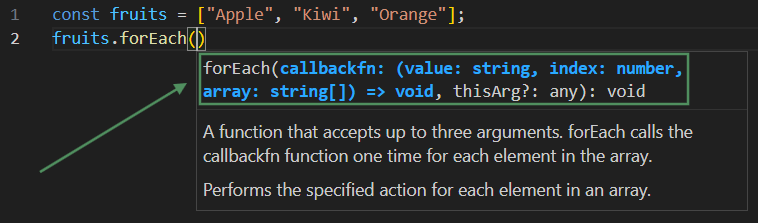
const fruits = ["Apple", "Kiwi", "Orange"];
fruits.forEach(element => {
    console.log(element);
});

//Output:
//Apple
//Kiwi
//Orange
map():
It iterates over each element of array.
It returns a new array.
Original array remains unchanged.
It also take upto 3 argunments similar to forEach: i.e.
currentElement, index, array.
const numbers = [1, 2, 3, 4, 5];

const doubled = numbers.map((num) => {
  return num * 2;
});

//We can also write arrow fxn in this way:
//const doubled = numbers.map((num) => num * 2);

console.log(numbers);
// Original => [ 1, 2, 3, 4, 5 ]

console.log(doubled);
// New Array => [ 2, 4, 6, 8, 10 ]
filter():
It iterates over each element of array.
It returns a new array with only matching elements.
Original array remains unchanged.
const numbers = [1, 2, 3, 4, 5, 6];

const evenNumbers = numbers.filter((num) => num % 2 === 0);

console.log(numbers);
// Original => [ 1, 2, 3, 4, 5, 6 ]

console.log(evenNumbers);
// New Array => [ 2, 4, 6 ]
reduce():
It iterates over each element of array.
It returns a single value (not an array).
It reduces whole array into one value.
const numbers = [1, 2, 3, 4, 5];

const sum = numbers.reduce((accumulator, num) => {
  return accumulator + num;
}, 0);

console.log(sum);
// 15
Here's a clearer example for reduce():
const orders = [
  { dish: "Pasta Carbonara", price: 14, spicy: false, qty: 2 },
  { dish: "Dragon Ramen", price: 12, spicy: true, qty: 1 },
  { dish: "Caesar Salad", price: 9, spicy: false, qty: 3 },
  { dish: "Inferno Wings", price: 11, spicy: true, qty: 2 },
  { dish: "Truffle Risotto", price: 18, spicy: false, qty: 1 },
];

const grouped = orders.reduce(
  (acc, order) => {
    const category = order.spicy ? "spicy" : "mild";
    acc[category].push(order.dish);
    return acc;
  },
  { spicy: [], mild: [] },
);

console.log(grouped);

/*
{
  spicy: [ 'Dragon Ramen', 'Inferno Wings' ],
  mild: [ 'Pasta Carbonara', 'Caesar Salad', 'Truffle Risotto' ]
}
*/
Difference in forEach(), map(), filter(), reduce():
| forEach | map | filter | reduce | |
|---|---|---|---|---|
| Returns | nothing | new array | new array | single value |
| Original array | unchanged | unchanged | unchanged | unchanged |
| Output size | - | same as original | equal or smaller | one value |
| Use when | sirf loop karna ho | transform karna ho | kuch elements nikalne ho | sab ko ek mein banana ho |
| Callback returns | nothing | transformed value | true / false | accumulated value |


