
Control Flow in JavaScript: If, Else, and Switch Explained
1. Introduction
Control flow statements are one of the easiest topics which we can understand just by reflecting to our life. It's similar to the life choices we often make.
Imagine you are in your 1st semester and you demand a gaming laptop from your parents for coding but they put a condition to you and that condition is:
If you score 9+ cgpa then you will be getting a new gaming laptop...
else you'll have to conitnue using your old laptop!!
In exact same way flow statements works in javascript.
2. Control Flow Statements
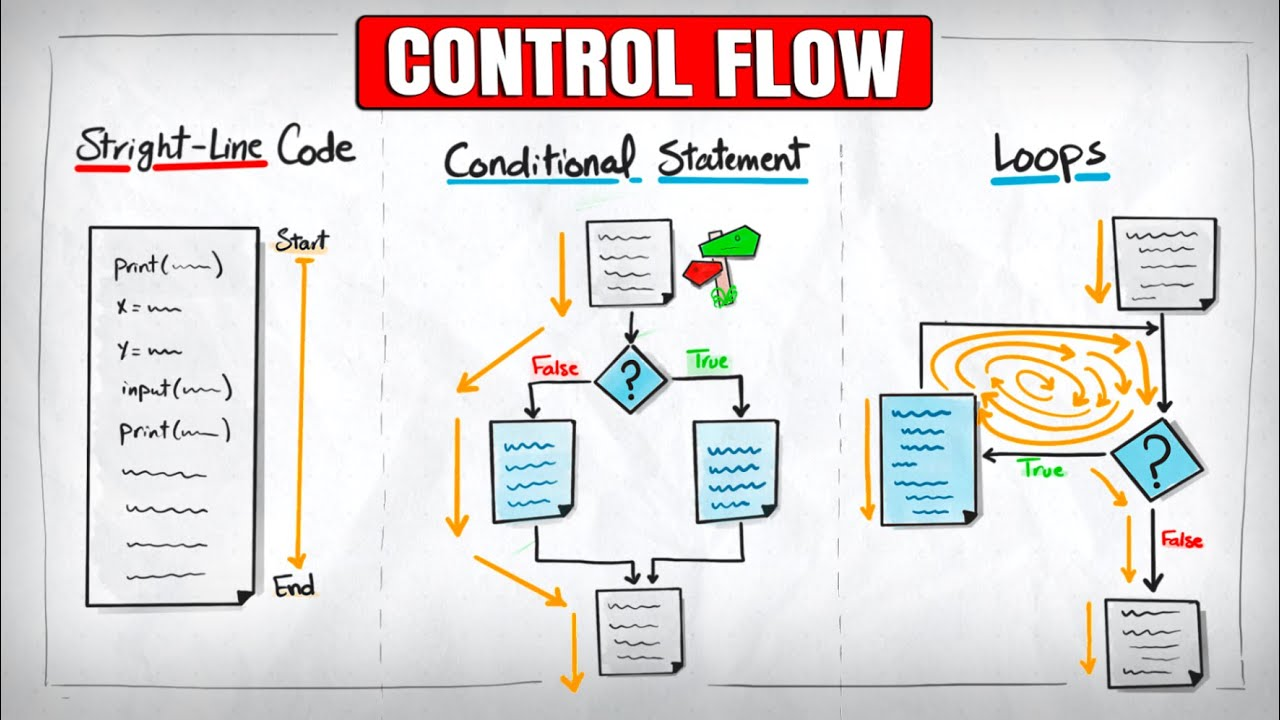
Javascript provided multiple ways to control and optimise our code, these are:
1. Conditional Statements — "Make a decision"
2. Loops — "Repeat something"
3. Jump Statements — "Skip or Stop"
4. Exception Handling — "Handle errors"
But in this blog we have to cover Conditional Statements only, rest would be cover later.
Conditional Statements:
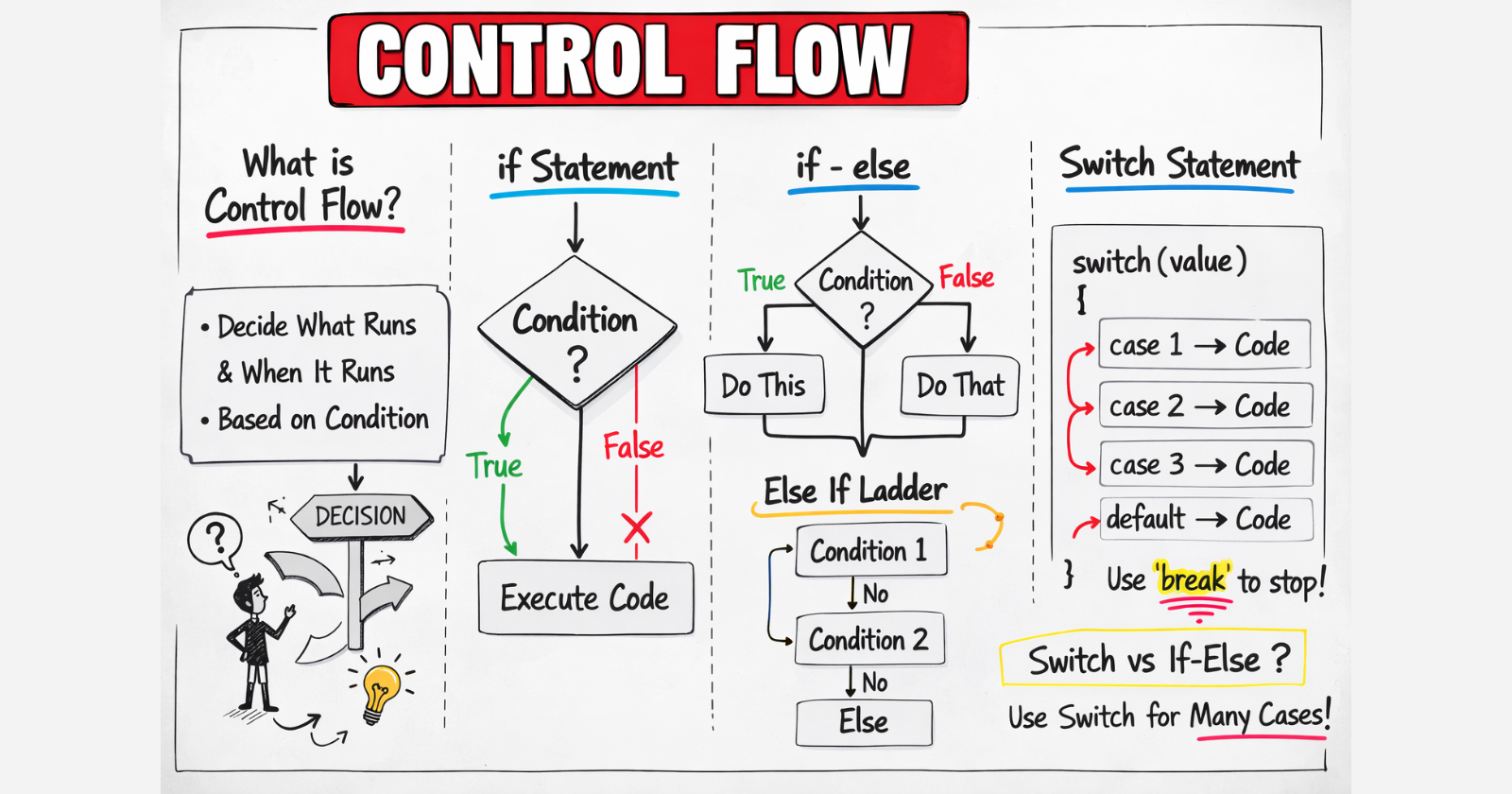
As it named conditional, we have conditions and it could be single, double or multiple, similiar to laptop example as we discussed above. There are multiple conditional statements:
The
ifstatement - single statementsThe
if-elsestatement - double statementsThe
else ifladder - multiple StatementsThe
switchstatement - multiple Statements
if statement:
When there is only one condition available. If it's true then it'll happens otherwise nothing would happened.
Example: If you work hard for the next 6 month you'll get a job.
const workingHard = true;
if(workingHard){
  console.log("Got A Job");    // ✅ this runs
}

// Output: Got A Job
if-else:
When there is two condition present and it depends when you are gonna fall into.
Example: If you have 8.5+ cgpa then you eligible for all companies othwerwise eligible for sales companies only.
const cgpa = 8.6;
if(cgpa >= 8.5){
  console.log("Eligible for all companies");    // ✅ this runs
}
else{
  console.log("Eligible for sales companies only");
}

// Output: Eligible for all companies
else-if ladder:
When you have multiple conditions then a else-if ladder designed.
Example: if you have done only dsa you will get 5 lpa, else if you have done webDev you get 6 lpa else if both 12 lpa else jobless.
const DSA = true;
const webDev = true;
if(DSA && webDev)
  console.log("12 lpa");    // ✅ this runs
else if (DSA)
  console.log("5 lpa");
else if (webDev)
  console.log("6 lpa");
else
  console.log("JOBLESS");

// Output: 12 lpa
Switch Statements:
Switch may look similar to else-if ladder, so first we have to understand how exactly switch works then we would check their use cases and what works better in different scenarios.
Example: You want to order a pizza, and the size depends on your choice. Whether you want small, medium, or large, it executes accordingly.
let size = "Medium";

switch (size) {
    case "Small":
        console.log("Small pizz");
        break;
    case "Medium":
        console.log("Medium pizza");  // ✅ this runs
        break;
    case "Large":
        console.log("Large pizza");
        break;
    default:
        console.log("Invalid size! ❌");
}

// Output: Medium pizza
What's BREAK inside switch statements?
The break is the saviour and it's responsible for faster execution in switch statements. Once you hit a condition and it execute and reads "break" it terminates the switch and jumps to the next line of code where switch ends.
If we do not add "break" then it'll check every conditon after hitting the correct one, which can cause more no of execution and hence take more time, which eventually make our program slow.
3. Switch VS else-if ladder
Switch has Cleaner Code :
When you stack multiple else if one after another — it's called a ladder because it looks like one.
if (day === "Monday") {
    console.log("Start of week");
} else if (day === "Tuesday") {
    console.log("Second day");
} else if (day === "Wednesday") {
    console.log("Middle of week");
} else if (day === "Thursday") {
    console.log("Almost Friday");
} else if (day === "Friday") {
    console.log("Weekend soon!");
} else {
    console.log("Weekend!");
}
Same thing with switch:
switch (day) {
    case "Monday":
        console.log("Start of week");
        break;
    case "Tuesday":
        console.log("Second day");
        break;
    case "Wednesday":
        console.log("Middle of week");
        break;
    case "Thursday":
        console.log("Almost Friday");
        break;
    case "Friday":
        console.log("Weekend soon!");
        break;
    default:
        console.log("Weekend!");
}
Much cleaner and easier to read!!
When to use switch !?
- You are checking ONE variable against MANY exact values
// Checking one variable (color) against exact values
switch (color) {
    case "red":
        console.log("Stop!");
        break;
    case "yellow":
        console.log("Slow down!");
        break;
    case "green":
        console.log("Go!");
        break;
}
- You have 3 or more conditions on the same variable
// More than 3 conditions? switch is cleaner
switch (grade) {
    case "A":
        console.log("Excellent!");
        break;
    case "B":
        console.log("Good!");
        break;
    case "C":
        console.log("Average");
        break;
    case "D":
        console.log("Poor");
        break;
    default:
        console.log("Fail");
}
- Multiple cases do the SAME thing
switch (day) {
    case "Saturday":
    case "Sunday":
        // both fall into same block!
        console.log("It's weekend! 🎉");
        break;
    default:
        console.log("It's a weekday 😩");
}
When to use else-if ladder !?
- You are checking RANGES or COMPLEX conditions
// switch CANNOT do this ❌
let marks = 75;

if (marks >= 90) {
    console.log("A grade");
} else if (marks >= 80) {
    console.log("B grade");
} else if (marks >= 70) {
    console.log("C grade");
} else {
    console.log("Fail");
}
- You are checking MULTIPLE different variables
// checking different variables ❌ bad for switch
if (age > 18 && hasLicense === true) {
    console.log("Can drive!");
} else if (age > 18 && hasLicense === false) {
    console.log("Get a license first!");
} else {
    console.log("Too young to drive!");
}
- You only have 1 or 2 conditions
// just 2 conditions? else if is fine
if (isLoggedIn) {
    console.log("Welcome back!");
} else {
    console.log("Please login");
}


